<?xml version="1.0" encoding="utf-8"?><feed xmlns="http://www.w3.org/2005/Atom" ><generator uri="https://jekyllrb.com/" version="4.3.2">Jekyll</generator><link href="https://digitalscepter.com/feed.xml" rel="self" type="application/atom+xml" /><link href="https://digitalscepter.com/" rel="alternate" type="text/html" /><updated>2026-03-12T23:29:47+00:00</updated><id>https://digitalscepter.com/feed.xml</id><title type="html">Digital Scepter</title><entry><title type="html">CVE-2024-3400: PAN GlobalProtect Vulnerability Customer Warning</title><link href="https://digitalscepter.com/articles/2024-04-12-pan-gp-gateway-vuln" rel="alternate" type="text/html" title="CVE-2024-3400: PAN GlobalProtect Vulnerability Customer Warning" /><published>2024-04-12T00:00:00+00:00</published><updated>2024-04-16T22:03:58+00:00</updated><id>https://digitalscepter.com/articles/pan-gp-gateway-vuln</id><content type="html" xml:base="https://digitalscepter.com/articles/2024-04-12-pan-gp-gateway-vuln"><![CDATA[<p><strong>UPDATE: As of 2:00 PM PDT PAN has announced that customers may be vulnerable even if telemetry is disabled. We strongly recommend that customers install threat updates and patch immediately as we have observed active exploitation of this issue.</strong></p>

<h2 id="summary">Summary</h2>
<p>On April 11, 2024, Palo Alto Networks (PAN) released a <a href="https://security.paloaltonetworks.com/CVE-2024-3400">security advisory</a> warning customers of a critical vulnerability affecting certain PAN-OS versions configured as GlobalProtect Portals or Gateways. The vulnerability, tracked as CVE-2024-3400, allows an unauthenticated attacker to execute arbitrary code on the affected device.</p>

<p>Although PAN has released patches for the affected PAN-OS versions, we recommend that customers practice defense-in-depth by following the mitigation steps outlined in this article.</p>

<p>Palo Alto Networks Unit 42 has published additional information on the exploitation of the vulnerability in the wild. You can read their blog post here:</p>

<p><a href="https://unit42.paloaltonetworks.com/cve-2024-3400/">Threat Brief: Operation MidnightEclipse, Post-Exploitation Activity Related to CVE-2024-3400</a>.</p>

<p>The organization that discovered the vulnerability being exploited in the wild, Volexity, has also published a blog post on their findings:</p>

<p><a href="https://www.volexity.com/blog/2024/04/12/zero-day-exploitation-of-unauthenticated-remote-code-execution-vulnerability-in-globalprotect-cve-2024-3400/">Zero-Day Exploitation of Unauthenticated Remote Code Execution Vulnerability in GlobalProtect (CVE-2024-3400)</a></p>

<h2 id="remediation-flow-chart">Remediation Flow Chart</h2>

<p>The following flow chart provides a high-level overview of the vulnerability and the recommended mitigation steps:</p>

<p><img src="/assets/images/article-content/pan-gp-vuln-flowchart.svg" alt="PAN GlobalProtect Vulnerability Flow Chart" /></p>

<h2 id="affected-pan-os-versions">Affected PAN-OS Versions</h2>

<table class="table table-bordered table-striped">
  <thead>
    <tr>
      <th>PAN-OS Train</th>
      <th>Affected Versions</th>
    </tr>
  </thead>
  <tbody>
    <tr>
      <td>11.1</td>
      <td>&lt; 11.1.2-h3</td>
    </tr>
    <tr>
      <td>11.0</td>
      <td>&lt; 11.0.4-h1</td>
    </tr>
    <tr>
      <td>10.2</td>
      <td>&lt; 10.2.9-h1</td>
    </tr>
  </tbody>
</table>

<h2 id="mitigation-steps">Mitigation Steps</h2>

<h3 id="upgrade-to-a-patched-version">Upgrade to a Patched Version</h3>
<p>Here are all the versions that have been patched by PAN:</p>

<p>PAN-OS 10.2:</p>
<ul>
  <li>10.2.9-h1 (Released 4/14/24)</li>
  <li>10.2.8-h3 (Released 4/15/24)</li>
  <li>10.2.7-h8 (Released 4/15/24)</li>
  <li>10.2.6-h3 (ETA: 4/16/24)</li>
  <li>10.2.5-h6 (ETA: 4/16/24)</li>
  <li>10.2.3-h13 (ETA: 4/17/24)</li>
  <li>10.2.1-h2 (ETA: 4/17/24)</li>
  <li>10.2.2-h5 (ETA: 4/18/24)</li>
  <li>10.2.0-h3 (ETA: 4/18/24)</li>
  <li>10.2.4-h16 (ETA: 4/19/24)</li>
</ul>

<p>PAN-OS 11.0:</p>
<ul>
  <li>11.0.4-h1 (Released 4/14/24)</li>
  <li>11.0.3-h10 (ETA: 4/16/24)</li>
  <li>11.0.2-h4 (Released 4/16/24)</li>
  <li>11.0.1-h4 (ETA: 4/17/24)</li>
  <li>11.0.0-h3 (ETA: 4/18/24)</li>
</ul>

<p>PAN-OS 11.1:</p>
<ul>
  <li>11.1.2-h3 (Released 4/14/24)</li>
  <li>11.1.1-h1 (ETA: 4/16/24)</li>
  <li>11.1.0-h3 (ETA: 4/17/24)</li>
</ul>

<h3 id="install-latest-content-updates">Install Latest Content Updates</h3>
<p>PAN has released content update 8833-8682 that includes a signature to detect and block attempts to exploit the vulnerability. We recommend that all customers install this content update as soon as possible.</p>

<p>To determine if a firewall has received the content update, go to <code class="language-plaintext highlighter-rouge">Dashboard &gt; General Information</code> and check the <code class="language-plaintext highlighter-rouge">Threat</code> version to make sure it is at least <code class="language-plaintext highlighter-rouge">8833-8682</code>.</p>

<h3 id="making-sure-the-content-update-is-effective">Making Sure the Content Update is Effective</h3>
<p>The content update does not patch the vulnerability, but provides a signature to detect and block exploitation attempts. In order for this signature to be effective, the firewall must have a security policy that allows traffic to the GlobalProtect Portal or Gateway with correctly configured security profiles. We recommend that customers review the relevant security polices and their security profiles to ensure that the firewall is configured to block any attempts to exploit the vulnerability.</p>

<p>For many customers the <code class="language-plaintext highlighter-rouge">interzone-default</code> security policy will allow traffic to the GlobalProtect Portal or Gateway as the traffic is typically “outside to outside” traffic. If you are not sure which security policy is used for GlobalProtect traffic, review your logs to determine the policy that is being hit.</p>]]></content><author><name></name></author><category term="falco" /><category term="palo alto networks" /><category term="customer warning" /><category term="vulnerability" /><category term="CVE-2024-3400" /><summary type="html"><![CDATA[A high-level overview of the 2024 PAN GlobalProtect Vulnerability (CVE-2024-3400) and how it affects customers.]]></summary></entry><entry><title type="html">2024 PAN Cert Expiration: Customer Warning</title><link href="https://digitalscepter.com/articles/2024-01-09-2024-pan-cert-expiration" rel="alternate" type="text/html" title="2024 PAN Cert Expiration: Customer Warning" /><published>2024-01-09T00:00:00+00:00</published><updated>2024-03-04T17:52:13+00:00</updated><id>https://digitalscepter.com/articles/2024-pan-cert-expiration</id><content type="html" xml:base="https://digitalscepter.com/articles/2024-01-09-2024-pan-cert-expiration"><![CDATA[<p><strong>NOTE: This article is intended to be supplemental to <a href="https://live.paloaltonetworks.com/t5/tkb/articleprintpage/tkb-id/SupportAnnouncements/article-id/353/comment-id/353">PAN’s official forum post</a>. We advise that all customers read through our high-level summary and then read the official post.</strong></p>

<p><strong>Customers using PAN-DB Private Cloud or a WildFire Private Cloud Appliance (WF-500) should read the official post for additional information.</strong></p>

<h2 id="summary">Summary</h2>
<p>On January 8th, 2024 Palo Alto Networks announced that five additional certificates that secure core services will soon expire. When these certificates expire, their respective services will be affected unless customer action is taken. Here is a summary of the certificates that will expire and the services that will be affected:</p>

<table class="table table-bordered table-striped">
  <thead>
    <tr>
      <th>Expiration Date</th>
      <th>Certificate</th>
      <th>Affected Services</th>
    </tr>
  </thead>
  <tbody>
    <tr>
      <td>2024-04-07</td>
      <td>Panorama Management</td>
      <td>Connections from devices to Panoramas</td>
    </tr>
    <tr>
      <td>2024-09-02</td>
      <td>URL PAN-DB Private Cloud</td>
      <td>Connections to M-Series running PAN-DB Private Cloud</td>
    </tr>
    <tr>
      <td>2024-11-18</td>
      <td>Device Certificate for Cloud Delivered Security Services</td>
      <td>All content updates except Threat Prevention / Adv. Threat Protection</td>
    </tr>
    <tr>
      <td>2024-11-18</td>
      <td>User-ID Agent and Terminal Server Default Certificate</td>
      <td>Connections from devices to User-ID Agents and Terminal Servers</td>
    </tr>
    <tr>
      <td>2026-01-01</td>
      <td>WildFire Appliance CA Certificate</td>
      <td>Connections to WF-500 devices</td>
    </tr>
  </tbody>
</table>

<h2 id="remediation">Remediation</h2>
<p>Since there are multiple certificates expiring customers will need to take multiple actions to remediate. We recommend that all customers do <em>ALL</em> of the following:</p>

<ol>
  <li>Upgrade all devices to a hotfix listed in <a href="https://live.paloaltonetworks.com/t5/tkb/articleprintpage/tkb-id/SupportAnnouncements/article-id/353/comment-id/353">PAN’s announcement</a></li>
  <li>Ensure that Device Certificates are present on <em>ALL</em> devices</li>
  <li>Upgrade all User-ID Agents and Terminal Servers to a hotfix listed in PAN’s announcement</li>
</ol>

<p>Additionally, PAN has provided a fix for the Panorama management certificate expiration in content update versions <strong>8795-8489</strong> and higher. This resolves the issue of the April 7th, 2024 Panorama certificate expiration, but customers will still need to take the above actions to remediate the other certificate expirations. Additionally, after this content update is installed, <em>you must reboot the device in order for the Panorama cert issue to be resolved</em>. Since this requires a reboot, we recommend that customers instead upgrade to a hotfixed version, as it takes care of all the certificate expirations in the same amount of time.</p>

<h3 id="remediation-flow-chart">Remediation Flow Chart</h3>

<p>Here is a simplified flow chart that applies to most customers:</p>

<p style="width: 80%"><img src="/assets/attachments/2024-cert-expiration-flowchart.svg" alt="Remediation Flow Chart" /></p>

<h3 id="upgrading-devices">Upgrading Devices</h3>

<table class="table table-bordered table-striped">
  <thead>
    <tr>
      <th>Release Train</th>
      <th>Fixed Versions</th>
    </tr>
  </thead>
  <tbody>
    <tr>
      <td>8.1</td>
      <td>8.1.21-h3,8.1.25-h3, 8.1.26 (including future releases)</td>
    </tr>
    <tr>
      <td>9.0</td>
      <td>9.0.16-h7, 9.0.17-h5</td>
    </tr>
    <tr>
      <td>9.1</td>
      <td>9.1.11-h5, 9.1.12-h7, 9.1.13-h5, 9.1.14-h8,9.1.16-h5, 9.1.17 (including future releases)</td>
    </tr>
    <tr>
      <td>10.0</td>
      <td>10.0.8-h11, 10.0.11-h4, 10.0.12-h5</td>
    </tr>
    <tr>
      <td>10.1</td>
      <td>10.1.3-h3, 10.1.4-h6,10.1.5-h4, 10.1.6-h8, 10.1.7-h1, 10.1.8-h7, 10.1.9-h8, 10.1.10-h5, 10.1.11-h4, 10.1.12 (including future releases)</td>
    </tr>
    <tr>
      <td>10.2</td>
      <td>10.2.0-h2, 10.2.1-h1, 10.2.2-h4, 10.2.3-h11, 10.2.4-h10, 10.2.6-h1, 10.2.7-h3, 10.2.8 (including future releases)</td>
    </tr>
    <tr>
      <td>11.0</td>
      <td>11.0.0-h2, 11.0.1-h3, 11.0.2-h3, 11.0.3-h3, 11.0.4* (including future releases)</td>
    </tr>
    <tr>
      <td>11.1</td>
      <td>11.1.0-h2, 11.1.1 (including future releases)</td>
    </tr>
  </tbody>
</table>

<p>The upgrade to the fixed versions of PAN-OS is no different than any regular PAN-OS update. Consult <a href="https://live.paloaltonetworks.com/t5/tkb/articleprintpage/tkb-id/SupportAnnouncements/article-id/353/comment-id/353">PAN’s official forum post</a> for the fixed version in your release train.</p>

<p>Before upgrading, we always recommend taking a configuration backup from the device from <strong>Device &gt; Setup &gt; Operations &gt; Configuration Management &gt; Export Named Configuration Snapshot</strong> and exporting the <strong>running-config.xml</strong> file. This will allow you to restore the device configuration if there is an issue with the new version.</p>

<p>As always, we recommend failing over an HA pair <em>before</em> performing an upgrade. This ensures that there is no latent issues with the secondary device that could cause an extended outage after the primary devices reboots to perform the upgrade.</p>

<h3 id="installing-device-certificates">Installing Device Certificates</h3>
<p><strong>NOTE: This may not apply to you as newer devices ship with a Device Certificate pre-installed. We still recommend reviewing all your devices to ensure that they have device certificates present.</strong></p>

<p><strong>We have observed newer generation firewalls (PA-4XX) that <em>do not</em> have Device Certificates pre-installed from the factory.</strong></p>

<p>See PAN’s documentation: <br />
<a href="https://docs.paloaltonetworks.com/pan-os/10-2/pan-os-admin/certificate-management/obtain-certificates/device-certificate">Installing Device Certificates on Standalone Firewalls (10.2)</a> <br />
<a href="https://docs.paloaltonetworks.com/panorama/10-2/panorama-admin/set-up-panorama/install-the-panorama-device-certificate">Installing Device Certificates on Panorama (10.2)</a> <br />
<a href="https://docs.paloaltonetworks.com/panorama/10-2/panorama-admin/set-up-panorama/install-the-device-certificate-for-a-dedicated-log-collector">Installing Device Certificates on Log Collectors (10.2)</a></p>

<h3 id="upgrading-user-id-agents-and-terminal-servers">Upgrading User-ID Agents and Terminal Servers</h3>

<table class="table table-bordered table-striped">
  <thead>
    <tr>
      <th>Release Train</th>
      <th>Fixed Versions</th>
    </tr>
  </thead>
  <tbody>
    <tr>
      <td>9.0</td>
      <td>9.0.6</td>
    </tr>
    <tr>
      <td>9.1</td>
      <td>9.1.5</td>
    </tr>
    <tr>
      <td>10.0</td>
      <td>10.0.7</td>
    </tr>
    <tr>
      <td>10.1</td>
      <td>10.1.2</td>
    </tr>
    <tr>
      <td>10.2</td>
      <td>10.2.2</td>
    </tr>
    <tr>
      <td>11.0</td>
      <td>11.0.1</td>
    </tr>
  </tbody>
</table>

<p>Consult <a href="https://live.paloaltonetworks.com/t5/tkb/articleprintpage/tkb-id/SupportAnnouncements/article-id/353/comment-id/353">PAN’s official forum post</a> for the fixed version of the User-ID Agent and/or Terminal Server. Download the appropriate version from the <a href="https://support.paloaltonetworks.com/">PAN Support Portal</a> and install it on the User-ID Agent and/or Terminal Server.</p>

<p>After installation, make sure that the User-ID Agent and/or Terminal Server is running and firewalls/Panorama show it as connected.</p>]]></content><author><name></name></author><category term="falco" /><category term="palo alto networks" /><category term="customer warning" /><summary type="html"><![CDATA[A high-level overview of the 2024 PAN certificate expiration and remediation steps.]]></summary></entry><entry><title type="html">Dec 2023 PAN Cert Expiration: Customer Warning</title><link href="https://digitalscepter.com/articles/2023-11-14-pan-cert-expiration" rel="alternate" type="text/html" title="Dec 2023 PAN Cert Expiration: Customer Warning" /><published>2023-11-14T00:00:00+00:00</published><updated>2023-11-18T00:04:39+00:00</updated><id>https://digitalscepter.com/articles/pan-cert-expiration</id><content type="html" xml:base="https://digitalscepter.com/articles/2023-11-14-pan-cert-expiration"><![CDATA[<h2 id="summary">Summary</h2>

<p>On November 7th, 2023 <a href="https://live.paloaltonetworks.com/t5/customer-advisories/emergency-update-required-pan-os-root-and-default-certificate/tac-p/565443#M305">Palo Alto Networks announced that there are two upcoming certificate expirations</a> that may cause disruptions for customers. <em>Despite both issues involving certificates, they are unrelated and require different actions to resolve</em>.</p>

<p>The first issue affects basically all devices and is easy to remediate. The second issue affects only customers with Data Redistribution configured and involves a more complicated remediation process. This post will describe both issues and how to resolve them.</p>

<h2 id="issue-1-content-update-certificate-expiration">Issue #1: Content Update Certificate Expiration</h2>

<h3 id="description">Description</h3>

<p>Internally, PAN devices verify the authenticity of content updates by checking the signature of the update against a certificate. This certificate is set to expire on December 31th, 2023. If the certificate expires, content updates will fail to install. This will cause the device to stop receiving new signatures for threats, applications, and other content. This will not affect the ability of the device to pass traffic, but it will cause the device to be unable to detect new threats and applications.</p>

<h3 id="affected-devices">Affected Devices</h3>

<p>Any devices that retrieve content updates from Palo Alto Networks, including Panoramas.</p>

<h3 id="resolution">Resolution</h3>

<p>There are three remediation paths for this issue:</p>

<ol>
  <li>Install content update version 8776-8390 or later on all your devices</li>
  <li>Upgrade the PAN-OS version on all your devices to a <a href="https://live.paloaltonetworks.com/t5/customer-advisories/emergency-update-required-pan-os-root-and-default-certificate/tac-p/565443#toc-hId--1012535588">patched version of PAN-OS</a></li>
  <li><a href="https://docs.paloaltonetworks.com/pan-os/10-2/pan-os-admin/certificate-management/obtain-certificates/device-certificate">Install a Device Certificate</a> on your devices (not recommended)</li>
</ol>

<p>We recommend that customers choose option #1 and install content update <strong>8776-8390</strong> as this is the easiest and most straightforward option. This content update is available now and can be installed on any PAN-OS version. For customers with many firewalls we recommend using Panorama to push the content update to all devices if they are not already configured to automatically install the latest content updates.</p>

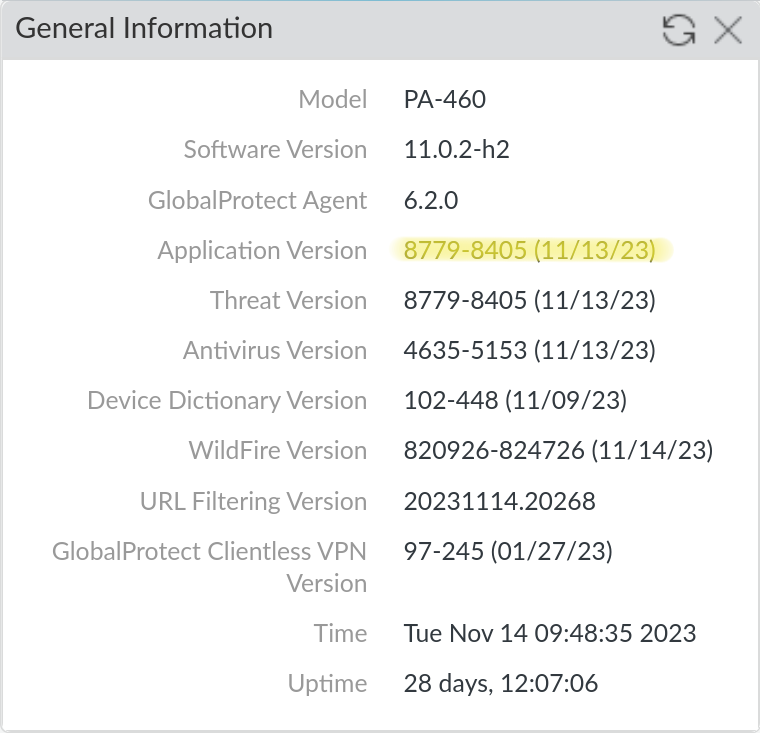
<p>To verify that you have the correct content update installed, you can check the <strong>Application Version</strong> on <strong>Dashboard &gt; General Information</strong>.</p>

<p><img class="shadow" alt="Validate the content update version" src="/assets/images/article-content/pan-cert-expiration-content-updates.png" /></p>

<h2 id="issue-2-default-data-redistribution-certificate-expiration">Issue #2: Default Data Redistribution Certificate Expiration</h2>

<h3 id="description-1">Description</h3>

<p>Data Redistribution is the umbrella term for the mechanism by which PAN devices can share user information with each other. Data Redistribution includes User-ID, IP-tags, User-tags, GlobalProtect HIP results and quarantine list entries. By default, the device to device communication uses a predefined certificate to secure these communications. This certificate is set to expire on December 31th, 2023. If the certificate expires, devices will be unable to share user information with each other, which could lead to an outage if that information is required for security policy enforcement.</p>

<h3 id="affected-devices-1">Affected Devices</h3>

<p>Any device that acts as a client or server for Data Redistribution, including Panoramas.</p>

<h3 id="resolution-1">Resolution</h3>

<p>There are two remediation paths for this issue:</p>

<ol>
  <li>Upgrade the PAN-OS version on all your devices to a <a href="https://live.paloaltonetworks.com/t5/customer-advisories/emergency-update-required-pan-os-root-and-default-certificate/tac-p/565443#toc-hId--1012535588">patched version of PAN-OS</a> (recommended)</li>
  <li>Use custom certificates to secure the Data Redistribution communication (not recommended for customers using Panorama)</li>
</ol>

<p>We strongly recommend that customers upgrade rather than attempt to configure custom certificates, especially for customers using Panorama. The custom certificate configuration is complex and does not scale well (see the <em>For Panorama Customers</em> section below for more details), in addition to making firewall onboarding more difficult. Additionally, the custom certificate configuration appears to apply to the User-ID agents as well, which means that you would need to install the same custom certificates on all your User-ID agents as well. This is not documented anywhere, but was confirmed experimentally in our lab environment.</p>

<p>With that caveat, below are the steps to configure custom certificates for Data Redistribution. PAN also publishes a <a href="https://docs.paloaltonetworks.com/panorama/10-2/panorama-admin/set-up-panorama/set-up-authentication-using-custom-certificates">guide to configuring custom certificates</a>, though it is geared towards securing device to Panorama communication.</p>

<h4 id="client-vs-server">Client vs. Server</h4>

<p><em>Note</em>: This guide shows the steps for both the client and server side of the communication as devices are typically both at once. If you know a device will only be a client or server you can skip the steps for the other role. Each section is labeled with the role it applies to.</p>

<h4 id="for-panorama-customers">For Panorama Customers</h4>

<p>We don’t recommend that customers use custom certificates to secure Data Redistribution if they are using Panorama. This is because if you enable custom certificates on Panorama <em>there is no option to enable it only for data redistribution</em>. This means that you’ll have to use the custom certs for communication with Panorama, which could cause an outage if you have not installed the new certificates on all your devices. If you are using Panorama we recommend that you upgrade all your devices to a patched version of PAN-OS instead.</p>

<p>Additionally, <em>you can not push the configuration option to enable custom certs for the Panorama configuration from a Panorama template</em>. This means that you’d have to create a local override on each Panorama managed firewall in order to deal with the fact that custom certs on Panorama for Data Redistribution force custom certs for the Panorama management connection. Since this solution doesn’t scale well we recommend that you upgrade all your devices to a patched version of PAN-OS instead.</p>

<p><em>Note</em>: On a Panorama everything that would be on the <strong>Device</strong> tab is on the <strong>Panorama</strong> tab instead.</p>

<h4 id="prerequisites">Prerequisites</h4>

<ul>
  <li>The <em>public key</em> to a CA certificate that you will use to validate the certificates of other devices. This certificate must be in PEM or PKCS12 format.</li>
  <li>The <em>private key</em> to a certificate signed by the above CA that you will use to encrypt communications between devices. This certificate must be in PEM or PKCS12 format.</li>
</ul>

<p>We recommend that customers use their existing PKI (typically Active Directory Certificate Services) to manage all their internal certificates, however you could generate both of these certificates on a PAN device if you do not have a PKI in place already.</p>

<h4 id="1-import-the-certificates-client--server">1: Import the certificates (Client &amp; Server)</h4>

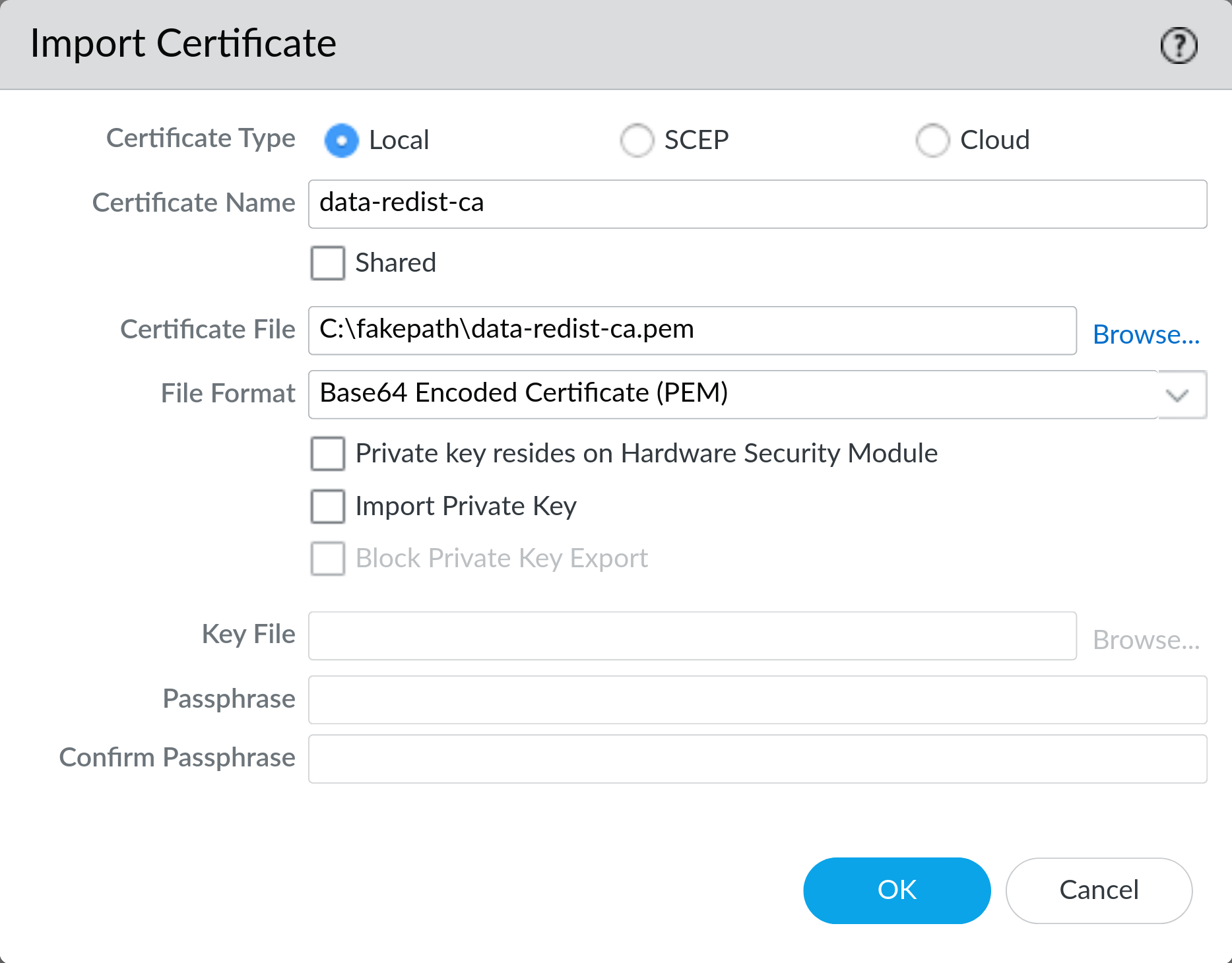
<p>On <strong>Device &gt; Certificate Management &gt; Certificates</strong> click <strong>Import</strong> and import the CA certificate. If you do not have an existing CA certificate you can generate one on the device here. Make sure to export this CA certificate and install it on all your devices so they can validate each other’s certificates.</p>

<p><img class="shadow" alt="Import the CA certificate" src="/assets/images/article-content/pan-cert-expiration-ca-import.png" /></p>

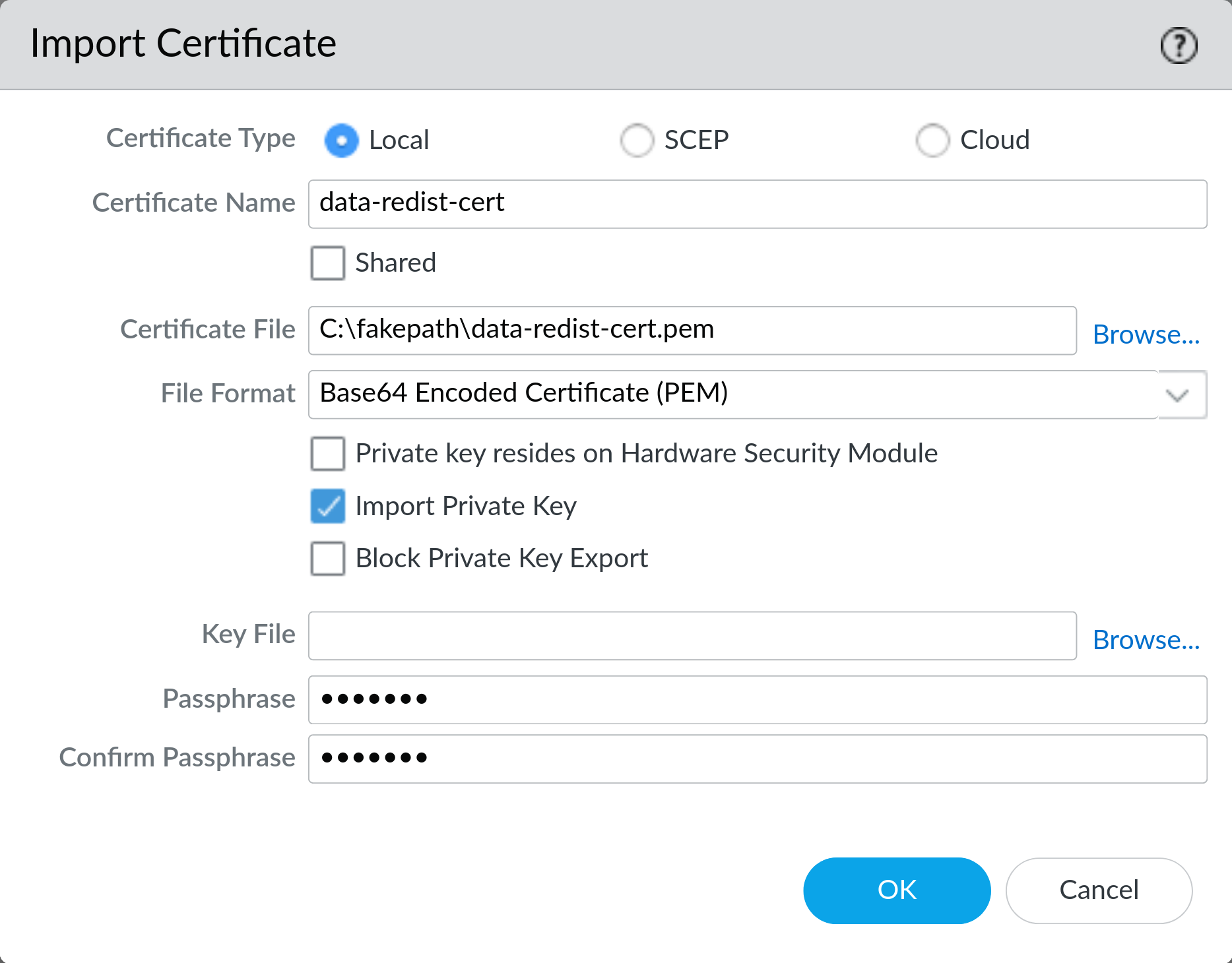
<p>On <strong>Device &gt; Certificate Management &gt; Certificates</strong> click <strong>Import</strong> and import the certificate with the private key. If you’re using PEM formatted cert be sure to check <strong>Import Private Key</strong>. If the certificate is password protected you will need to enter the password here.</p>

<p><em>Note</em>: if the cert is not password protected you will still need to provide a password here, but it will not be used.</p>

<p><img class="shadow" alt="Import the client certificate" src="/assets/images/article-content/pan-cert-expiration-cert-import.png" /></p>

<p>If you do not have an existing certificate you can generate one signed by the CA you created earlier on the device here. Make sure to export this certificate and install it on all your devices so they can encrypt communications with each other.</p>

<h4 id="2-configure-a-certificate-profile-client-and-server">2: Configure a Certificate Profile (Client and Server)</h4>

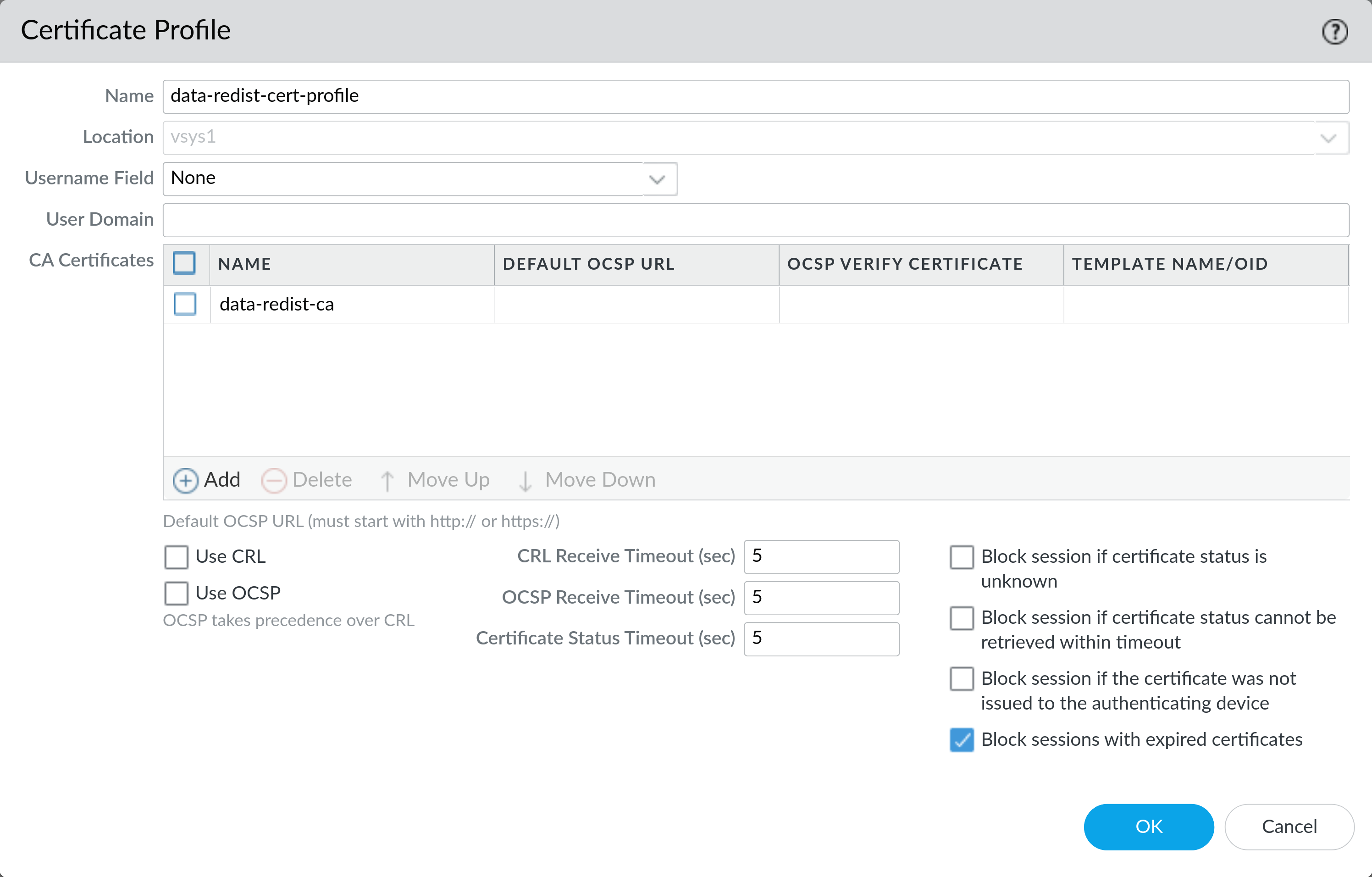
<p>On <strong>Device &gt; Certificate Management &gt; Certificate Profile</strong> click <strong>Add</strong> and create a new profile. Give it a name and select the CA certificate you imported earlier.</p>

<p>Enable <strong>Block sessions with expired Certificates</strong> Click <strong>OK</strong> to save the profile.</p>

<p><img class="shadow" alt="Configure a certificate profile" src="/assets/images/article-content/pan-cert-expiration-cert-profile.png" /></p>

<h4 id="3-configure-an-ssltls-service-profile-server">3: Configure an SSL/TLS Service Profile (Server)</h4>

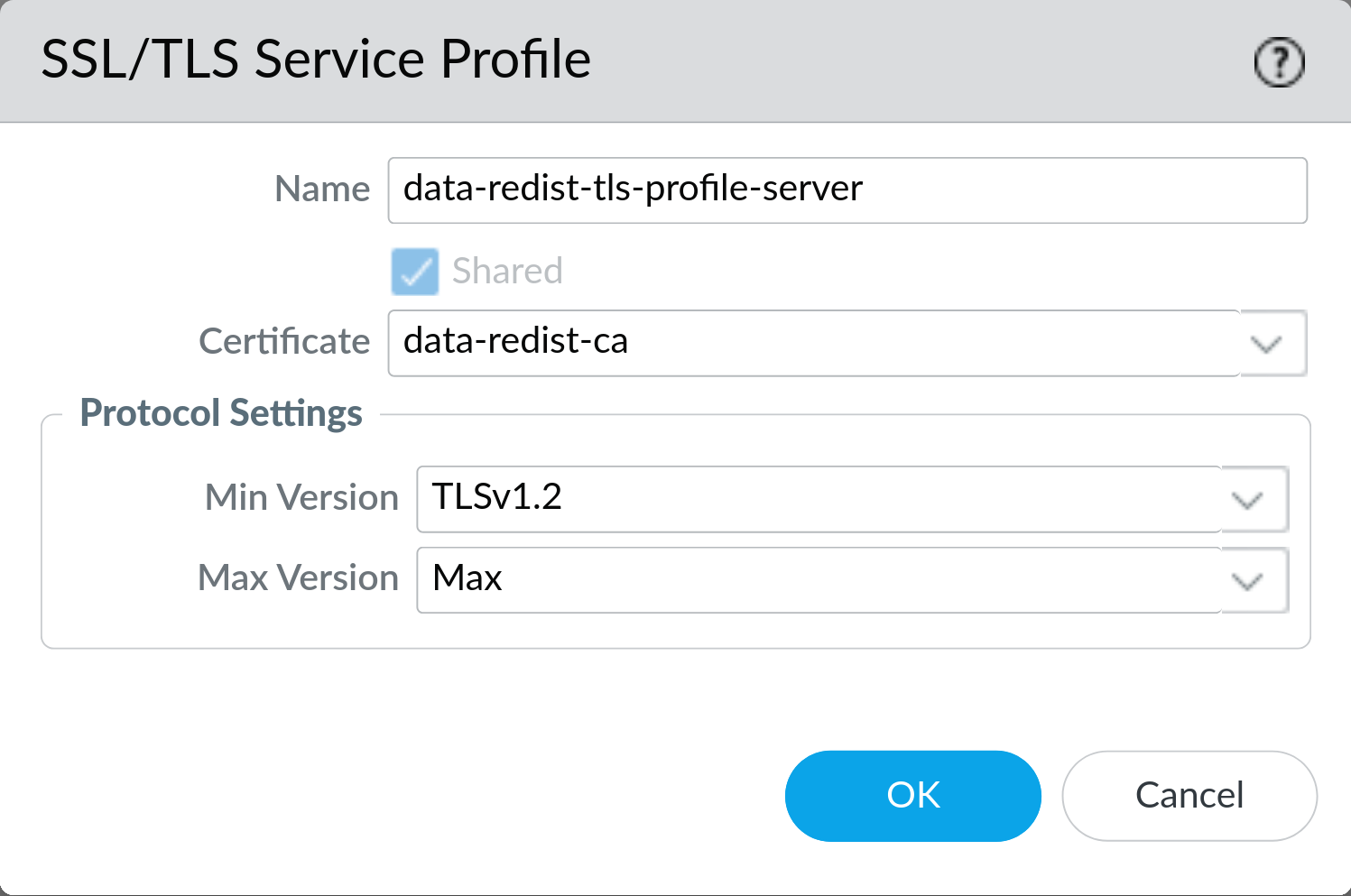
<p>On <strong>Device &gt; Certificate Management &gt; SSL/TLS Service Profile</strong> click <strong>Add</strong> and create a new profile. Give it a name and select the certificate with the private key you imported earlier.</p>

<p>Set the <strong>Min Version</strong> to <strong>TLSv1.2</strong> and leave the <strong>Max Version</strong> set to <strong>Max</strong>. Click <strong>OK</strong> to save the profile.</p>

<p><img class="shadow" alt="Configure an SSL/TLS service profile" src="/assets/images/article-content/pan-cert-expiration-tls-profile.png" /></p>

<h4 id="4-enable-secure-data-redistribution-client">4: Enable Secure Data Redistribution (Client)</h4>

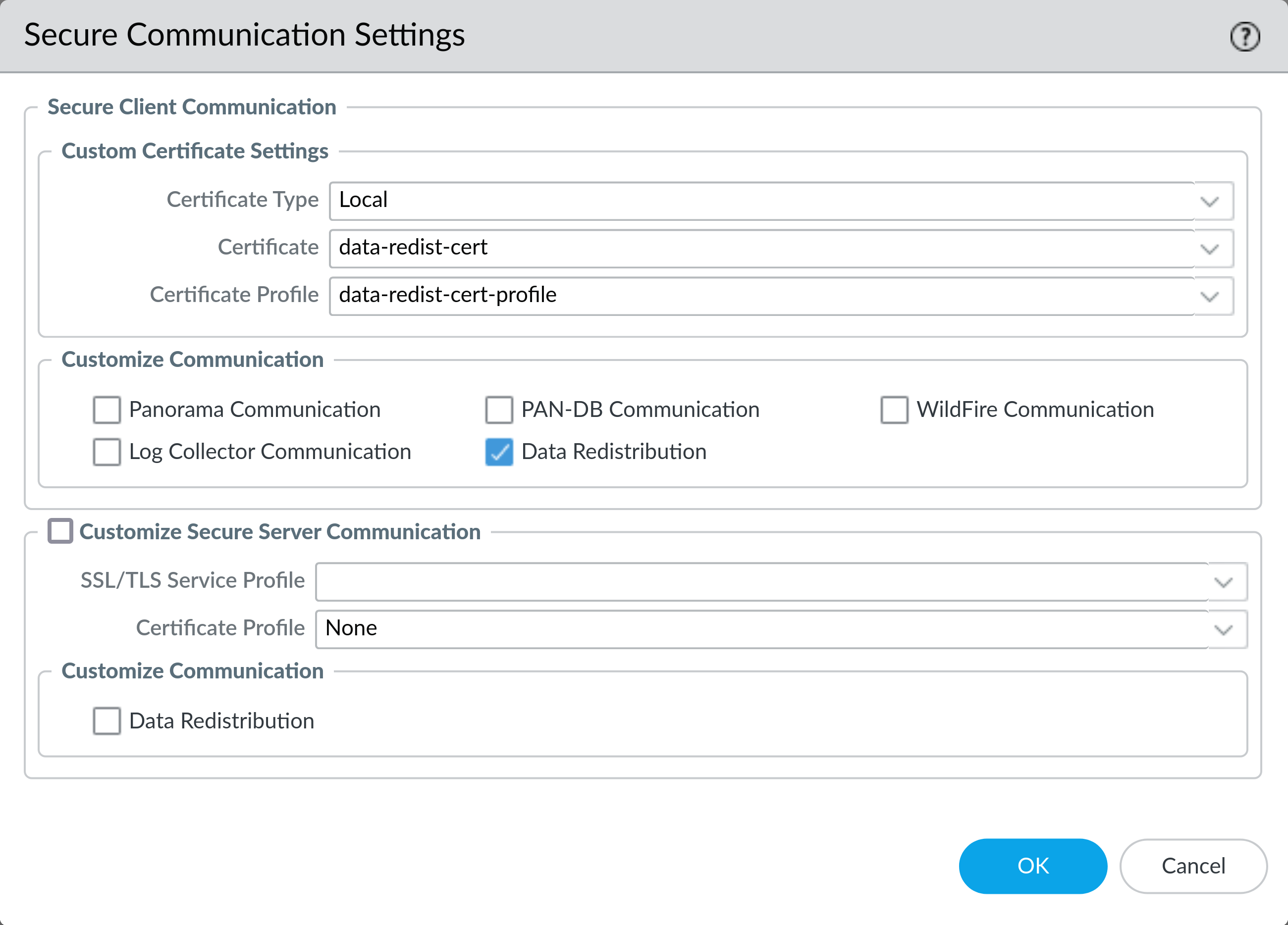
<p>On <strong>Device &gt; Setup &gt; Management</strong> click the gear icon at the top right of the <strong>Secure Communication Settings</strong> section. Under <strong>Secure Client Communications &gt; Custom Certificate Settings &gt; Certificate Type</strong> select <strong>Local</strong> from the dropdown.</p>

<p>Then select the certificate with the private key you imported earlier from the <strong>Certificate</strong> dropdown. Select the certificate profile you created earlier from the <strong>Certificate Profile</strong> dropdown. Check the box for <strong>Data Redistribution</strong> and click <strong>OK</strong> to save the settings.</p>

<p><img class="shadow" alt="Enable secure data redistribution as client" src="/assets/images/article-content/pan-cert-expiration-secure-client.png" /></p>

<h4 id="5-enable-secure-data-redistribution-server">5: Enable Secure Data Redistribution (Server)</h4>

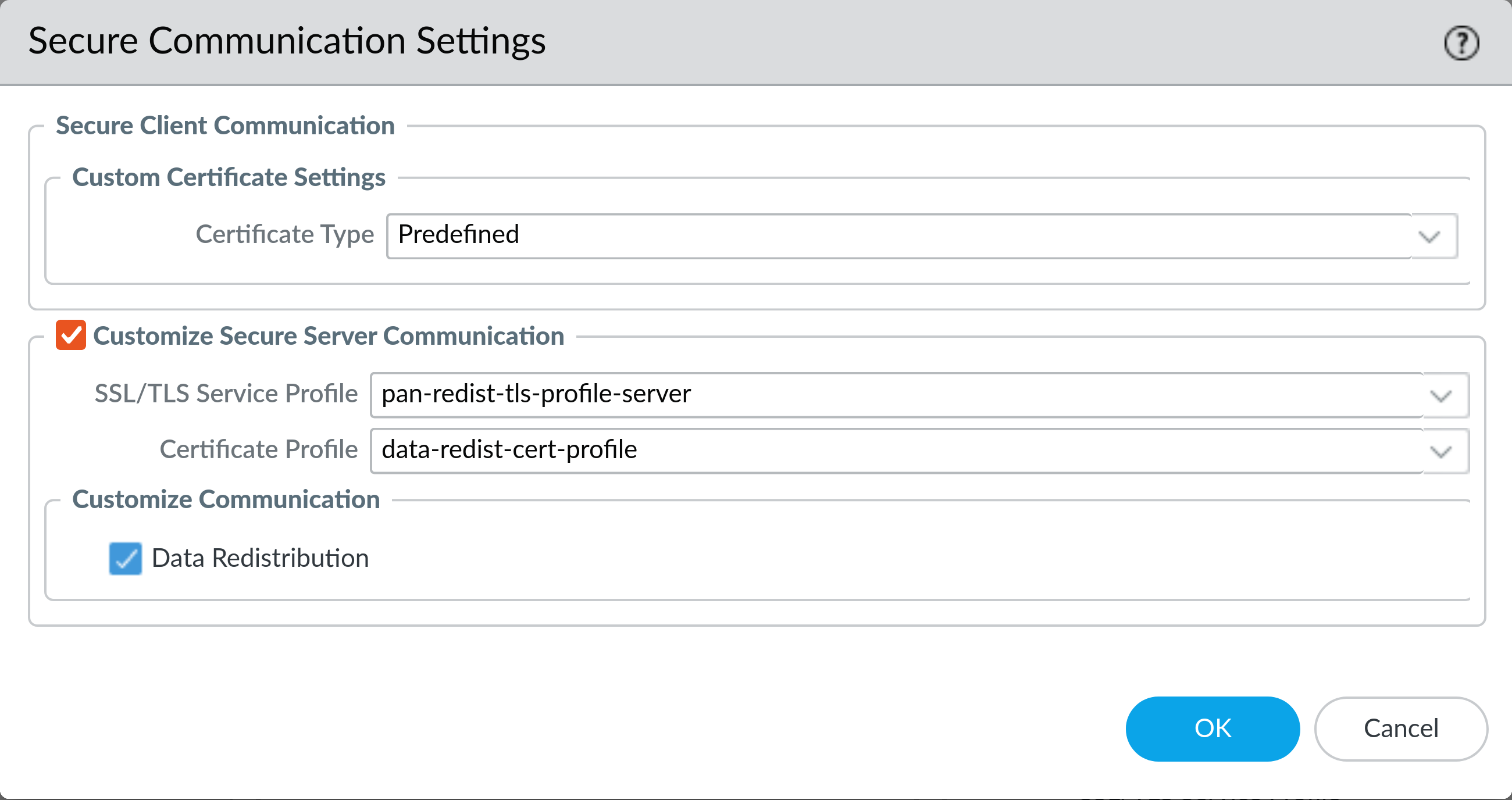
<p>On <strong>Device &gt; Setup &gt; Management</strong> click the gear icon at the top right of the <strong>Secure Communication Settings</strong> section. Under <strong>Customize Secure Server Communication</strong> select the SSL/TLS service profile you created earlier from the <strong>SSL/TLS Service Profile</strong> dropdown.</p>

<p>Then select the appropriate <strong>Certificate Profile</strong> that you created earlier. Check the box for <strong>Data Redistribution</strong> and click <strong>OK</strong> to save the settings.</p>

<p><img class="shadow" alt="Enable secure data redistribution as server" src="/assets/images/article-content/pan-cert-expiration-secure-server.png" /></p>

<h4 id="6-commit-the-configuration-changes-client-and-server">6: Commit the configuration changes (Client and Server)</h4>
<p><strong>Warning</strong>: Once you commit these changes the devices will begin to use the new certificates. If you have not installed the new certificates on all your devices you may cause an outage. Redistributed User-ID entries <em>should be</em> cached, so quickly committing on both the client and the server should cause User-ID latency, but not an outage.</p>

<p>Commit the configuration changes to the device. If you are using Panorama you will need to push the changes to the devices.</p>

<h2 id="addendum-checking-a-data-redistribution-servers-certificate">Addendum: Checking a Data Redistribution Servers Certificate</h2>
<p>If you have have <a href="https://www.openssl.org/">openssl</a> installed (typically installed by default on most Linux distros and OSX) you can check the expiration date of the Data Redistribution server certificate with the following command:</p>

<div class="language-bash highlighter-rouge"><div class="highlight"><pre class="highlight"><code>openssl s_client <span class="nt">-showcerts</span> <span class="nt">-connect</span> firewall.example.com:5007 2&gt;&amp;1 | <span class="nb">grep </span>NotAfter
</code></pre></div></div>

<p>Note that we’ve redirected STDERR to STDOUT with <code class="language-plaintext highlighter-rouge">2&gt;&amp;1</code> to keep the output clean. Replace <code class="language-plaintext highlighter-rouge">firewall.example.com</code> with the hostname or IP address of your firewall.</p>

<p>This should produce output similar to the following:</p>

<div class="language-plaintext highlighter-rouge"><div class="highlight"><pre class="highlight"><code>   v:NotBefore: Feb  1 07:30:33 2023 GMT; NotAfter: Jan  1 07:30:33 2032 GMT
</code></pre></div></div>

<p>Here we can see that the certificate in use on this data redistribution server doesn’t expire until 2032, so it is not affected by issue #2.</p>]]></content><author><name></name></author><category term="falco" /><category term="palo alto networks" /><category term="customer warning" /><summary type="html"><![CDATA[At the end of 2023 there will be two certificate expirations that may cause issues for customers. This post describes both issues and how to resolve them.]]></summary></entry><entry><title type="html">OCDE Event: Palo Alto Networks Best Practices</title><link href="https://digitalscepter.com/articles/2023-10-11-pan-best-practices-slides" rel="alternate" type="text/html" title="OCDE Event: Palo Alto Networks Best Practices" /><published>2023-10-11T00:00:00+00:00</published><updated>2023-10-11T17:45:24+00:00</updated><id>https://digitalscepter.com/articles/PAN-best-practices-slides</id><content type="html" xml:base="https://digitalscepter.com/articles/2023-10-11-pan-best-practices-slides"><![CDATA[<p>Thanks for coming to the event at OCDE.  <a href="/assets/attachments/OCDE-PAN-Best-Practices-Slides-Oct-11-2023.pdf">Download the slides here.</a></p>]]></content><author><name></name></author><category term="falco" /><category term="palo alto networks" /><category term="best practices" /><summary type="html"><![CDATA[Presentation slides from October 11th 2023 at OCDE]]></summary></entry><entry><title type="html">Upcoming Events</title><link href="https://digitalscepter.com/events" rel="alternate" type="text/html" title="Upcoming Events" /><published>2023-10-06T00:00:00+00:00</published><updated>2026-02-25T21:07:38+00:00</updated><id>https://digitalscepter.com/digital-scepter-events</id><content type="html" xml:base="https://digitalscepter.com/events"><![CDATA[<h2 id="k12-six-2026">K12 SIX 2026</h2>

<h3 id="you-bought-an-ngfw-now-use-it-practical-security-patterns-for-palo-alto-networks-firewalls">You Bought an NGFW-Now Use It: Practical Security Patterns for Palo Alto Networks Firewalls</h3>
<p><strong>Location:</strong><br />
Alvarado B Breakout</p>

<p><strong>Date:</strong><br />
Wednesday February 25th, 2026</p>

<p><strong>Time:</strong><br />
2:30 - 3:15 PM MST</p>

<p>Most K-12 districts have already invested in next-generation firewalls, but many still run them like traditional firewalls—broad outbound access, little or no decryption, and weak identity-based enforcement. This session uses Palo Alto Networks firewalls to show how those gaps translate into real risk, and what “using the NGFW you already own” looks like in practice.</p>

<p>We’ll cover field-tested patterns for policy design, security profile enforcement, and identity/device context—plus how to regain visibility into encrypted traffic where today’s threats actually occur.</p>

<p>Attendees will also receive a firewall security scorecard to objectively assess their Palo Alto firewall posture and identify the highest-impact improvements to prioritize.</p>

<p><a href="/assets/attachments/k12-six-2026_you-bought-an-ngfw-now-use-it.pdf">Download the slide deck</a></p>

<h2 id="cite-2025">CITE 2025</h2>

<h3 id="palo-alto-networks-advanced-troubleshooting">Palo Alto Networks Advanced Troubleshooting</h3>
<p><strong>Location:</strong><br />
Ballroom A9</p>

<p><strong>Date:</strong><br />
Thursday, November 20th 2025</p>

<p><strong>Time:</strong><br />
1:00pm - 1:45pm PST</p>

<p>Dive into practical, real-world techniques for diagnosing and resolving common issues in Palo Alto Networks environments. This session covers how to uncover silent drops, interpret traffic and threat logs, use packet captures effectively, and apply key CLI tools for troubleshooting authentication, routing, VPN, and HA failover problems. Learn actionable tips and tricks to keep your deployments running smoothly and efficiently.</p>

<p><a href="/assets/attachments/cite-2025-advanced-troubleshooting.pdf">Download the slide deck</a></p>

<hr />
<h3 id="product-showcase-falco">Product Showcase: Falco</h3>
<p><strong>Location:</strong><br />
Meeting Room 1 &amp; 2</p>

<p><strong>Date:</strong><br />
Wednesday, November 19th, 2025</p>

<p><strong>Time:</strong><br />
9:30am - 9:50am PST</p>

<p>Managing a Palo Alto Networks firewall in an education environment is no small task. Over time, configuration drift, exceptions, and staff changes can quietly weaken even the best security posture. In this 20-minute product showcase, learn how <a href="/falco">Falco</a>, Digital Scepter’s automated firewall auditing platform, helps schools, districts, and higher-ed institutions stay ahead of misconfigurations, vulnerabilities, and regressions—without adding to your team’s workload.</p>

<p>See a live demo of Falco’s weekly firewall health report, discover easy wins for improving security posture, and walk away with access to a free <strong>Falco firewall scorecard</strong> for your organization.</p>

<hr />
<h3 id="the-definitive-guide-to-zero-trust">The Definitive Guide to Zero Trust</h3>
<p><strong>Location:</strong><br />
Meeting Room 10</p>

<p><strong>Date:</strong><br />
Tuesday, November 18th, 2025</p>

<p><strong>Time:</strong><br />
8:00am - 8:45am PST</p>

<p>Zero Trust isn’t a new security philosophy—it’s the modern enforcement of principles IT has always relied on: authentication, authorization, and least privilege. In this session, we’ll trace how those fundamentals evolved from traditional network zones and VPNs to today’s identity-driven, cloud-enforced models. Using real K-12 examples, we’ll explore how Google’s BeyondCorp and the NIST framework influence practical campus network designs, from segmented firewalls and 802.1X authentication to cloud-delivered Zero Trust solutions like Cloudflare Access and enterprise browsers. You’ll learn how to blend on-prem NGFWs with SaaS access control, map user roles (students, staff, faculty, parents) to the right access tiers, and prepare your network for a hybrid future.</p>

<p><a href="/assets/attachments/cite-2025-definitive-guide-to-zero-trust.pdf">Download the slide deck</a></p>

<hr />
<h1 id="past-events">Past Events</h1>

<h2 id="palo-alto-networks-zero-trust-best-practices-at-clovis-unified-school-district">Palo Alto Networks Zero-Trust Best Practices at Clovis Unified School District</h2>
<p><strong>Location:</strong><br />
Clovis Unified School District,
1670 David E Cook Way,
Clovis, CA 93611</p>

<p><strong>Date:</strong><br />
Tuesday, April 29th, 2025</p>

<p><strong>Time:</strong><br />
10:00am - 2:00pm PDT</p>

<p>Join Digital Scepter and Clovis USD for a deep-dive into the latest features of Palo Alto Networks NGFW.  We’ll demonstrate best practices that you can use to immediately improve your security posture and get more from your firewalls.</p>

<p><strong>Agenda:</strong></p>
<ul>
  <li>How to set up Palo Alto Networks’s advanced security subscriptions.</li>
  <li>What’s new in PAN-OS 11</li>
  <li>Zero Trust Roadmap</li>
  <li>Details on setting up Inbound SSL decryption and Forward Proxy SSL Decryption</li>
  <li>Other best practices you can implement right away</li>
</ul>

<p><a href="/assets/attachments/clovis-best-practices-slides-apr-2025.pdf">Download the slide deck</a></p>

<hr />
<h2 id="palo-alto-networks-zero-trust-best-practices-at-citrus-college">Palo Alto Networks Zero-Trust Best Practices at Citrus College</h2>
<p><strong>Location:</strong><br />
Citrus College,
1000 W Foothill Blvd,
Room IS 107,
Glendora, CA, 91741</p>

<p><strong>Date:</strong><br />
Tuesday, April 15th, 2025</p>

<p><strong>Time:</strong><br />
10:00am - 2:00pm PDT</p>

<p>Join Digital Scepter and Citrus College for a deep-dive into the latest features of Palo Alto Networks NGFW.  We’ll demonstrate best practices that you can use to immediately improve your security posture and get more from your firewalls.</p>

<p><strong>Agenda:</strong></p>
<ul>
  <li>How to set up Palo Alto Networks’s advanced security subscriptions.</li>
  <li>What’s new in PAN-OS 11</li>
  <li>Zero Trust Roadmap</li>
  <li>Details on setting up Inbound SSL decryption and Forward Proxy SSL Decryption</li>
  <li>Other best practices you can implement right away</li>
</ul>

<p><a href="/assets/attachments/citrus-best-practices-slides-apr-2025.pdf">Download the slide deck</a></p>

<hr />
<h2 id="cite-2024-presentations">CITE 2024 Presentations</h2>
<h3 id="decryption-blueprint-building-a-two-tier-ca-for-ssl-inspection-pdf"><a href="assets/attachments/Decryption-Blueprint-Building-A-Two-Tier-CA-for-SSL-Inspection-CITE-2024.pdf">Decryption Blueprint: Building a Two-Tier CA for SSL Inspection (PDF)</a></h3>

<p>With these slides, you will learn how to build and deploy a secure, scalable two-tier Certificate Authority (CA) infrastructure. You’ll explore the configuration of both root and subordinate CAs, manage certificate lifecycles, and implement best practices for securing your PKI environment.
Additionally, you’ll delve into SSL/TLS decryption using Palo Alto Networks Firewalls, gaining the skills to secure encrypted traffic and enhance network visibility. The course will guide you through integrating your CA with a Palo Alto firewall to enable SSL decryption, configuring decryption policies, and troubleshooting common issues. By the end, you will have the expertise to deploy a robust CA environment and ensure SSL decryption for secure network communications.</p>

<p>Key Learning Objectives:
   • Understand Public Key Infrastructure (PKI) concepts and two-tier CA architecture
   • Build and configure a Root and Subordinate Certificate Authority
   • Manage certificates, revocations, and certificate enrollment
   • Enable SSL decryption on Palo Alto Networks Firewalls using custom certificates
   • Configure decryption policies and best practices to secure encrypted traffic</p>

<p><a href="assets/attachments/Decryption-Blueprint-Building-A-Two-Tier-CA-for-SSL-Inspection-CITE-2024.pdf">Download the slide deck</a></p>

<hr />
<h3 id="implementing-zero-trust-security-architecture-pdf"><a href="assets/attachments/Implementing-Zero-Trust-Security-Architecture-Slides-CITE-2024.pdf">Implementing Zero Trust Security Architecture (PDF)</a></h3>

<p>In an era where traditional security models are no longer sufficient to protect against increasingly sophisticated cyber threats, the Zero-Trust security framework has emerged as a pivotal approach to safeguarding digital assets. This presentation will delve into how Palo Alto Networks enables and enhances Zero-Trust security through its comprehensive suite of solutions.
We will start by exploring the core principles of the Zero-Trust model, which asserts that no user, device, or network segment should be trusted by default, regardless of their location. The principle of “never trust, always verify” will be examined in detail, including its impact on organizational security posture.
The presentation will then transition into the specific features and capabilities offered by Palo Alto Networks to support a Zero-Trust architecture. Key topics will include:</p>
<ol>
  <li>Identity and Access Management: Leveraging Palo Alto Networks’ capabilities to enforce strict authentication and authorization policies.</li>
  <li>Network Segmentation and Micro-Segmentation: Implementing granular controls to segment and protect network traffic within and across organizational boundaries.</li>
  <li>Continuous Monitoring and Threat Detection: Utilizing Palo Alto Networks’ advanced threat detection and response tools to maintain visibility and control over network activity.</li>
  <li>Integration and Automation: How to integrate Zero-Trust principles with existing security infrastructure and automate enforcement to streamline operations and enhance security posture.
Attendees will gain a comprehensive understanding of how to design, configure, and deploy Zero-Trust security using Palo Alto Networks’ tools, ensuring robust protection against internal and external threats. We will also provide practical examples and best practices for effective implementation, along with a Q&amp;A session to address specific queries and challenges faced by organizations in their Zero-Trust journey.</li>
</ol>

<p><a href="assets/attachments/Implementing-Zero-Trust-Security-Architecture-Slides-CITE-2024.pdf">Download the slide deck</a></p>

<hr />
<h2 id="palo-alto-networks-zero-trust-best-practices-at-tahoe-truckee-unified-school-district">Palo Alto Networks Zero-Trust Best Practices at Tahoe Truckee Unified School District</h2>

<p><strong>Location:</strong><br />
Tahoe Truckee Unified School District
11603 Donner Pass Rd
Truckee, CA 96161, USA</p>

<p><strong>Date:</strong><br />
Wednesday May 1st, 2024</p>

<p><strong>Time:</strong><br />
10:00am - 2:00pm PDT</p>

<p>Join Digital Scepter for a deep-dive into the latest features of Palo Alto Networks NGFW.  We’ll demonstrate best practices that you can use to immediately improve your security posture and get more from your firewalls.</p>

<p><strong>Agenda:</strong></p>
<ul>
  <li>What is new about the Advanced security subscriptions?</li>
  <li>How to set up Palo Alto Networks’s advanced security subscriptions.</li>
  <li>What’s new in PAN-OS 11?</li>
  <li>Zero Trust Roadmap</li>
  <li>Details on setting up Inbound SSL decryption and Forward Proxy SSL Decryption</li>
  <li>Other best practices you can implement right away</li>
</ul>

<p><a href="/assets/attachments/tahoe-best-practices-slides-may-2024.pdf">Download the slide deck</a></p>

<hr />
<h2 id="palo-alto-networks-zero-trust-best-practices-at-sacramento-county-office-of-education">Palo Alto Networks Zero-Trust Best Practices at Sacramento County Office of Education</h2>

<p><strong>Location:</strong><br />
Sacramento County Office of Education
10474 Mather Blvd.
Mather CA 95655</p>

<p><strong>Date:</strong><br />
Wednesday April 17th, 2024</p>

<p><strong>Time:</strong><br />
9:00am - 1:00pm PDT</p>

<p>Join Digital Scepter for a deep-dive into the latest features of Palo Alto Networks NGFW.  We’ll demonstrate best practices that you can use to immediately improve your security posture and get more from your firewalls.</p>

<p><strong>Agenda:</strong></p>
<ul>
  <li>What is new about the Advanced security subscriptions?</li>
  <li>How to set up Palo Alto Networks’s advanced security subscriptions.</li>
  <li>What’s new in PAN-OS 11?</li>
  <li>Zero Trust Roadmap</li>
  <li>Details on setting up Inbound SSL decryption and Forward Proxy SSL Decryption</li>
  <li>Other best practices you can implement right away</li>
</ul>

<hr />
<h2 id="palo-alto-networks-zero-trust-best-practices-at-san-bernardino-county-superintendent-of-schools">Palo Alto Networks Zero-Trust Best Practices at San Bernardino County Superintendent of Schools</h2>

<p><strong>Location:</strong><br />
San Bernardino County Superintendent of Schools<br />
West End Educational Service Center
8265 Aspen Avenue
Rancho Cucamonga, CA 91730</p>

<p><strong>Date:</strong><br />
Wednesday February 14th, 2024</p>

<p><strong>Time:</strong><br />
10:00am - 2:00pm PDT</p>

<p>Join Digital Scepter for a deep-dive into the latest features of Palo Alto Networks NGFW.  We’ll demonstrate best practices that you can use to immediately improve your security posture and get more from your firewalls.</p>

<p><strong>Agenda:</strong></p>
<ul>
  <li>What is new about the Advanced security subscriptions?</li>
  <li>How to set up Palo Alto Networks’s advanced security subscriptions.</li>
  <li>What’s new in PAN-OS 11?</li>
  <li>Zero Trust Roadmap</li>
  <li>Details on setting up Inbound SSL decryption and Forward Proxy SSL Decryption</li>
  <li>Other best practices you can implement right away</li>
</ul>

<p><a href="/assets/attachments/sbcss-best-practices-slides-feb-2024.pdf">Download the slide deck</a></p>]]></content><author><name></name></author><category term="falco" /><category term="palo alto networks" /><category term="best practices" /><category term="events" /><summary type="html"><![CDATA[Live training workshops by Digital Scepter]]></summary></entry><entry><title type="html">Automating PAN Best Practices with Falco</title><link href="https://digitalscepter.com/articles/2022-11-30-automating-best-practices-with-falco" rel="alternate" type="text/html" title="Automating PAN Best Practices with Falco" /><published>2022-11-30T00:00:00+00:00</published><updated>2023-03-03T21:48:33+00:00</updated><id>https://digitalscepter.com/articles/automating-best-practices-with-falco</id><content type="html" xml:base="https://digitalscepter.com/articles/2022-11-30-automating-best-practices-with-falco"><![CDATA[<p>At CITE 2022 we gave a presentation on how to use <a href="/falco">Falco</a> to automate best practices for Palo Alto Networks firewalls. This post contains the slides from that presentation.</p>

<p><a href="/assets/attachments/falco-automating-best-practices.pdf">Click Here to download the slides</a></p>]]></content><author><name></name></author><category term="falco" /><category term="palo alto networks" /><category term="best practices" /><summary type="html"><![CDATA[Slides from our presentation at CITE 2022]]></summary></entry><entry><title type="html">Palo Alto Networks High Availability and Support Options</title><link href="https://digitalscepter.com/articles/2022-11-25-palo-alto-networks-high-availability-and-support-options" rel="alternate" type="text/html" title="Palo Alto Networks High Availability and Support Options" /><published>2022-11-25T00:00:00+00:00</published><updated>2024-01-26T00:03:25+00:00</updated><id>https://digitalscepter.com/articles/palo-alto-networks-high-availability-and-support-options</id><content type="html" xml:base="https://digitalscepter.com/articles/2022-11-25-palo-alto-networks-high-availability-and-support-options"><![CDATA[<p>Deciding how to handle your Palo Alto Networks HA needs is a business decision based on the probability and impact of down time. Regardless of where you are on the scale, there are options for you.</p>

<h2 id="active-active-or-active-passive-high-availability">Active-Active or Active-Passive High Availability</h2>

<p>If you can pony up and get the second device for HA, you can greatly minimize downtime. There’s no additional discount for the second device in an HA pair and you’ll also needs to purchase support (see below) for both devices in the HA pair. There are HA SKUs for subscriptions that do provide a discount compared to buying two separate subscriptions.</p>

<p>Approximate Down Time: <em>None (with a single failure)</em></p>

<h2 id="onsite-spare">Onsite Spare</h2>

<p>The next best alternative is a cold spare. They are typically discounted 50-60% from list price. You don’t need to buy support. In the event of a primary device failure, you open a ticket and transfer your licenses, then upgrade the software and import your config (you had a back up right?). Another option is to
use your legacy device as a cold or warm backup.</p>

<p>Approximate Down Time: <em>Two hours</em></p>

<h2 id="4-hour-support">4-hour Support</h2>

<p>This option is offered in most areas, but not all, so check with your rep. If your primary device fails, a replacement will be delivered within four hours. You have to add time to open the ticket, process the RMA, update and config.</p>

<p>Approximate Down Time: <em>Seven hours</em></p>

<h2 id="premium-support">Premium Support</h2>

<p>This is 24x7 phone support like the option above, but after processing an RMA, you get your replacement the next day.</p>

<p>Approximate Down Time: <em>30 hours</em></p>

<h2 id="standard-support">Standard Support</h2>

<p>This is 8x5 phone support and you have to return your device to the factory before they ship you a replacement. Not recommended.</p>

<p>Approximate Down Time: <em>72 hours</em></p>]]></content><author><name>Jon Robinson</name></author><category term="palo alto networks" /><category term="high availability" /><category term="support" /><summary type="html"><![CDATA[Learn how the different HA and support options can help you minimize downtime.]]></summary></entry><entry><title type="html">Palo Alto Networks CLI Cheatsheet</title><link href="https://digitalscepter.com/articles/2022-11-11-cli-cheatsheet" rel="alternate" type="text/html" title="Palo Alto Networks CLI Cheatsheet" /><published>2022-11-11T00:00:00+00:00</published><updated>2024-01-26T00:03:25+00:00</updated><id>https://digitalscepter.com/articles/cli-cheatsheet</id><content type="html" xml:base="https://digitalscepter.com/articles/2022-11-11-cli-cheatsheet"><![CDATA[<p><strong>Note:</strong> Commands that begin with <code>#</code> indicate that they must be entered while in configure mode.</p>

<table class="table table-striped">
    <thead>
        <th>Description</th>
        <th>Command(s)</th>
    </thead>
    <tbody>
        
        <tr>
            <td>Enter configuration mode</td>
            <td>
                
                
                <code>
                    
                        &gt; 
                    
                    configure
                </code><br />
                
            </td>
        </tr>
        
        <tr>
            <td>Restart the device</td>
            <td>
                
                
                <code>
                    
                        &gt; 
                    
                    request restart system
                </code><br />
                
            </td>
        </tr>
        
        <tr>
            <td>Ping a destination</td>
            <td>
                
                
                <code>
                    
                        &gt; 
                    
                    ping host &lt;destination&gt;
                </code><br />
                
            </td>
        </tr>
        
        <tr>
            <td>Ping a destination from a particular interface IP</td>
            <td>
                
                
                <code>
                    
                        &gt; 
                    
                    ping host &lt;destination&gt; source &lt;interface ip&gt;
                </code><br />
                
            </td>
        </tr>
        
        <tr>
            <td>Find command by keyword</td>
            <td>
                
                
                <code>
                    
                        &gt; 
                    
                    find command keyword &lt;keyword&gt;
                </code><br />
                
            </td>
        </tr>
        
        <tr>
            <td>Show device information</td>
            <td>
                
                
                <code>
                    
                        &gt; 
                    
                    show system info
                </code><br />
                
            </td>
        </tr>
        
        <tr>
            <td>Show all jobs</td>
            <td>
                
                
                <code>
                    
                        &gt; 
                    
                    show jobs all
                </code><br />
                
            </td>
        </tr>
        
        <tr>
            <td>Show a particular job</td>
            <td>
                
                
                <code>
                    
                        &gt; 
                    
                    show jobs id &lt;id&gt;
                </code><br />
                
            </td>
        </tr>
        
        <tr>
            <td>Set the management interface to use a static IP</td>
            <td>
                
                
                <code>
                    
                        #
                    
                    set deviceconfig system type static
                </code><br />
                
                <code>
                    
                        #
                    
                    
set deviceconfig system ip-address &lt;ip-address&gt; netmask &lt;netmask&gt; default-gateway &lt;default-gateway&gt;
                </code><br />
                
            </td>
        </tr>
        
        <tr>
            <td>Commit changes</td>
            <td>
                
                
                <code>
                    
                        #
                    
                    commit
                </code><br />
                
            </td>
        </tr>
        
        <tr>
            <td>Fetch licenses from the support portal</td>
            <td>
                
                
                <code>
                    
                        &gt; 
                    
                    request license fetch
                </code><br />
                
            </td>
        </tr>
        
        <tr>
            <td>Show all licenses</td>
            <td>
                
                
                <code>
                    
                        &gt; 
                    
                    request license info
                </code><br />
                
            </td>
        </tr>
        
        <tr>
            <td>Delete all licenses</td>
            <td>
                
                
                <code>
                    
                        &gt; 
                    
                    delete license key *.key
                </code><br />
                
            </td>
        </tr>
        
        <tr>
            <td>Show the running route table</td>
            <td>
                
                
                <code>
                    
                        &gt; 
                    
                    show routing route
                </code><br />
                
            </td>
        </tr>
        
        <tr>
            <td>Show the forwarding table</td>
            <td>
                
                
                <code>
                    
                        &gt; 
                    
                    show routing fib
                </code><br />
                
            </td>
        </tr>
        
        <tr>
            <td>Test routing for a destination</td>
            <td>
                
                
                <code>
                    
                        &gt; 
                    
                    test routing fib-lookup ip &lt;destination&gt; virtual-router &lt;virtual router&gt;
                </code><br />
                
            </td>
        </tr>
        
        <tr>
            <td>Show all interfaces</td>
            <td>
                
                
                <code>
                    
                        &gt; 
                    
                    show interface all
                </code><br />
                
            </td>
        </tr>
        
        <tr>
            <td>Show interface details and counters</td>
            <td>
                
                
                <code>
                    
                        &gt; 
                    
                    show interface &lt;name&gt;
                </code><br />
                
            </td>
        </tr>
        
        <tr>
            <td>Show all ARP entries</td>
            <td>
                
                
                <code>
                    
                        &gt; 
                    
                    show arp all
                </code><br />
                
            </td>
        </tr>
        
        <tr>
            <td>Show ARP entries for a particular interface</td>
            <td>
                
                
                <code>
                    
                        &gt; 
                    
                    show arp &lt;interface&gt;
                </code><br />
                
            </td>
        </tr>
        
        <tr>
            <td>Display settings in set command format when show</td>
            <td>
                
                
                <code>
                    
                        &gt; 
                    
                    set cli config-output-format set
                </code><br />
                
            </td>
        </tr>
        
        <tr>
            <td>Show global system counters</td>
            <td>
                
                
                <code>
                    
                        &gt; 
                    
                    show counter global
                </code><br />
                
            </td>
        </tr>
        
        <tr>
            <td>Show global counters that have changed since last run</td>
            <td>
                
                
                <code>
                    
                        &gt; 
                    
                    show counter global filter delta yes
                </code><br />
                
            </td>
        </tr>
        
        <tr>
            <td>Show global counters that match the current packet capture filters</td>
            <td>
                
                
                <code>
                    
                        &gt; 
                    
                    show counter global filter packet-filter yes
                </code><br />
                
            </td>
        </tr>
        
        <tr>
            <td>Test an IKE gateway (phase 1)</td>
            <td>
                
                
                <code>
                    
                        &gt; 
                    
                    test vpn ike-sa gateway &lt;name&gt;
                </code><br />
                
            </td>
        </tr>
        
        <tr>
            <td>Test an IPSec tunnel (phase 1 &amp; 2)</td>
            <td>
                
                
                <code>
                    
                        &gt; 
                    
                    test vpn ipsec-sa tunnel &lt;name&gt;
                </code><br />
                
            </td>
        </tr>
        
        <tr>
            <td>Show installed transciever details for interface (&gt;= 10.0.0 only)</td>
            <td>
                
                
                <code>
                    
                        &gt; 
                    
                    show transceiver-detail &lt;interface&gt;
                </code><br />
                
            </td>
        </tr>
        
        <tr>
            <td>Show installed transciever details for X slot and Y port</td>
            <td>
                
                
                <code>
                    
                        &gt; 
                    
                    show system state filter sys.sX.pY.phy
                </code><br />
                
            </td>
        </tr>
        
        <tr>
            <td>Disable ZTP mode</td>
            <td>
                
                
                <code>
                    
                        &gt; 
                    
                    request disable-ztp
                </code><br />
                
            </td>
        </tr>
        
        <tr>
            <td>Show active session information</td>
            <td>
                
                
                <code>
                    
                        &gt; 
                    
                     show system statistics session
                </code><br />
                
            </td>
        </tr>
        
        <tr>
            <td>Show per-application session stats</td>
            <td>
                
                
                <code>
                    
                        &gt; 
                    
                     show system statistics application
                </code><br />
                
            </td>
        </tr>
        
        <tr>
            <td>Test a URL's categorization</td>
            <td>
                
                
                <code>
                    
                        &gt; 
                    
                     test url &lt;URL&gt;
                </code><br />
                
            </td>
        </tr>
        
        <tr>
            <td>Show all attributes for users with group mapping</td>
            <td>
                
                
                <code>
                    
                        &gt; 
                    
                     show user user-attributes user all
                </code><br />
                
            </td>
        </tr>
        
    </tbody>
</table>]]></content><author><name></name></author><category term="palo alto networks" /><category term="cli" /><category term="cheatsheet" /><summary type="html"><![CDATA[Details of the most often used CLI commands for PAN-OS]]></summary></entry><entry><title type="html">The First Step to Network Security</title><link href="https://digitalscepter.com/articles/2022-06-10-the-first-step-to-network-security" rel="alternate" type="text/html" title="The First Step to Network Security" /><published>2022-06-10T00:00:00+00:00</published><updated>2024-01-26T00:03:25+00:00</updated><id>https://digitalscepter.com/articles/the-first-step-to-network-security</id><content type="html" xml:base="https://digitalscepter.com/articles/2022-06-10-the-first-step-to-network-security"><![CDATA[<p>In our years of experience providing high quality perimeter protection and web security services, we at Digital Scepter have given businesses of all sizes the insight and expertise they require to navigate the complex – and often dangerous – arena of network security. Whether you hope to combat the threats of malicious attacks or employee misuse, and whether you use firewall hardware to mitigate incoming traffic or control access to applications and services, keeping your network secure is possibly the single most important task for any network administrator. It can be difficult for organizations to know where to begin when it comes to improving their network security.</p>

<p>How do you choose the right kind of perimeter protection solution for your unique business needs? Where should you focus your budget and attention to improve security dramatically, at a cost that makes sense for you? Learning which technology and policies you need to implement on your network is a process that begins with accurately assessing your existing network infrastructure.</p>

<p>At Digital Scepter, we encourage every organization to have a detailed breakdown of their network. Across hardware and software, creating an asset list is the first step in better understanding the security needs of your network, what you are doing to meet these demands, and how you can improve your network to keep your mission-critical or confidential data safe.</p>

<h3 id="understand-your-network-by-creating-an-asset-list">Understand your network by creating an asset list</h3>

<p>Ask any network administrator, and they will readily admit that modern corporate networks can be incredibly difficult to monitor. More and more hardware devices are being added to networks, and these devices are performing a number of different network functions, sometimes across wide and diverse geographical areas.</p>

<p>In the case of devices operated by your end-users, such as employees, software technology advances are growing rapidly, which can make the devices hard to monitor accurately. In addition, with the advent of cutting-edge technologies such as effective cloud storage, the location of your most important data is becoming increasingly distributed over multiple locations.</p>

<p>Creating an asset list is a task that essentially can be divided into three parts – hardware, software, and data.</p>

<h3 id="hardware">Hardware</h3>

<p>Look at your network topography and list every single hardware device you can find. This should include infrastructure devices such as routers, switches, and bridges, as well as every single node including mobile devices that connect to your network externally. Also, be sure to include your existing security devices, such as network firewalls or other perimeter protection devices.</p>

<p>Ultimately, if the hardware device is connecting directly to your network by any means, you should list it as part of your asset list.</p>

<h3 id="software">Software</h3>

<p>Examine the software that runs on your network. Some of the most commonly used applications will be ones that you have deployed on end-user machines, and listing each of these regularly used tools is relatively simple. You should take the time to understand which applications are being used, and also how they are being used. What do your users actually do with their web browsers? How are they sharing files via email?</p>

<h3 id="data">Data</h3>

<p>Finally, every asset list should cover the most important asset of every network: your data. Modern organizations thrive on their data and it is important to make a list detailing where your data is stored, the type of databases that this information is contained in, and whether the given data is highly confidential, of a personal nature, or contains payment and credit card information.</p>

<p>Determining the nature of the data is essential to determine if compliance and regulatory requirements need to be followed (e.g. HIPAA, PCI, Sarbanes-Oxley, Gramm-Leach-Bliley, etc.) Start now by taking the opportunity to create an asset list for your network. Consolidate your information on hardware, software, and data to fully understand your current security position.</p>

<p>Equipped with your asset list, it should be clearer than ever how crucial it is to implement robust and dependable network security solutions in order to keep your assets safe. The threats to your network are growing increasingly sophisticated – from complex network attacks to new methods for employees to circumvent your acceptable use policies. Does your asset list assure you that your network security can meet the very latest standards?</p>]]></content><author><name>Jon Robinson</name></author><category term="network security" /><category term="best practices" /><summary type="html"><![CDATA[Learn how creating an asset list can help you better understand your network security needs.]]></summary></entry><entry><title type="html">Video: Inbound Decryption on Palo Alto Networks</title><link href="https://digitalscepter.com/articles/2022-04-08-inbound-ssl-presentation" rel="alternate" type="text/html" title="Video: Inbound Decryption on Palo Alto Networks" /><published>2022-04-08T00:00:00+00:00</published><updated>2023-03-03T21:48:14+00:00</updated><id>https://digitalscepter.com/articles/inbound-ssl-presentation</id><content type="html" xml:base="https://digitalscepter.com/articles/2022-04-08-inbound-ssl-presentation"><![CDATA[<p>This recording was taken from our webinar on the subject from April 2022.</p>

<iframe width="100%" height="512" src="https://www.youtube.com/embed/Y8O_QyqZ1Oc" title="YouTube video player" frameborder="0" allow="accelerometer; autoplay; clipboard-write; encrypted-media; gyroscope; picture-in-picture" allowfullscreen=""></iframe>

<p><a href="/assets/attachments/inbound-inspection-presentation.pdf">Click Here to download the slides</a></p>]]></content><author><name></name></author><category term="palo alto networks" /><category term="decryption" /><summary type="html"><![CDATA[Learn how to setup inbound decryption to secure your internet facing resources]]></summary></entry></feed>